Claude Code skills, plus a hosted execution layer
Claude Code skills are SKILL.md folders on your filesystem that teach Claude Code a task. Connect UniversalBench and a skill can also run code in a hosted sandbox, reach your database and the live web, and make validated commits, all through one MCP URL. Your skills folder stays exactly where it is.
Skills are the recipe. The work still has to run somewhere.
A skill is a folder with a SKILL.md file: instructions, and often a few small scripts, that teach your AI how to do a job the same way every time. That is the recipe, and a recipe is not a kitchen. The moment a skill needs to run code, read a database, call the live web, or commit to a repo, that work has to execute somewhere, and you want it to run safely. MCP is how your AI reaches those tools. UniversalBench is the hosted place the work actually runs. The skill is the recipe, MCP is the wire, and UniversalBench is the kitchen.
See it in action
Skills run code, so the runtime matters
Anthropic is blunt about this in its own guidance: a skill can direct your AI to run code or call tools in ways that do not match its stated purpose, so you should only run skills you trust. When a skill’s steps run on UniversalBench, three checks are always on. Code is validated and confirmed to load before it is ever committed. Every model call is cost estimated and capped before it runs. No request can reach a private or internal network address. The work gets done without handing a skill the keys to everything.
Connect UniversalBench
Add the MCP server
In Claude Code, add the server with claude mcp add or your MCP config, pointing at your UniversalBench URL.
Keep your skills folder
Your SKILL.md files stay on the filesystem where Claude Code already reads them.
Save secrets in the vault
Store tokens and database URLs once in your secret vault.
Run heavier steps hosted
When a skill needs a hosted sandbox, your database, the web, or a validated commit, it runs through UniversalBench.
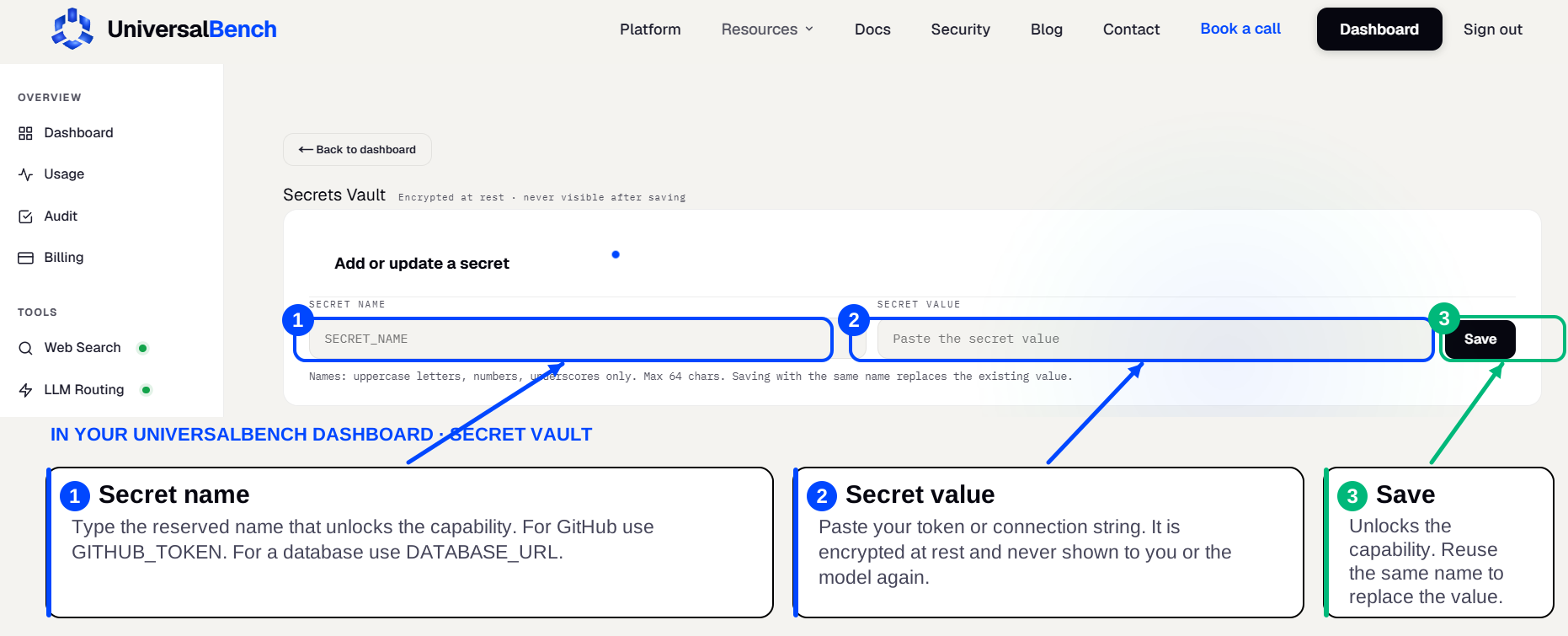
Credentials live in an encrypted secret vault
When a skill’s step needs a credential, a GitHub token, a database URL, an API key, you save it once in your secret vault. You enter the secret name on the left and the secret value on the right, then save. Your AI never sees the value, it is never shown in the chat, and the matching capability unlocks automatically.
A skill alone versus a skill with an execution layer
| Skill on its own | Skill plus UniversalBench | |
|---|---|---|
| What it gives the AI | Instructions and small scripts | Instructions plus real execution |
| Run code, query a database, hit the web | Only if the host provides it | One hosted URL covers all of it |
| Reach your tools | Depends on the surface | GitHub, Postgres, Slack, Sheets, and more |
| Safety on the work | Up to you to audit | Validated code, capped spend, no internal network |
| Credentials | In files or prompts | Encrypted vault, never shown |
Frequently asked questions
How is this different from a plain Claude Code skill?
A plain skill runs on your machine. Adding UniversalBench gives a skill a hosted sandbox plus your database, the web, and validated commits through one MCP URL, useful when you do not want the work running locally or unchecked.
How do I add it to Claude Code?
Add the server with claude mcp add or your MCP config, pointing at your UniversalBench URL, then your skills can call it.
Does it work with other clients?
Yes. The same URL works with Claude, ChatGPT, Gemini, Cursor, and any MCP-compatible AI.
Is it official?
No. Claude Code and skills are Anthropic. UniversalBench is an independent execution layer you connect.
Run your Claude Code skills hosted
One URL, first 1,000 calls free, no credit card.
Get your API key →