The hosted MCP server for your AI
We are the universal MCP server. Composio and Zapier manage the apps. UniversalBench manages all the MCP-server work behind the scenes.
An MCP server gives your AI the power to actually do things: run code, search the web, read and write databases, commit to GitHub, work with files, and more. UniversalBench is a hosted MCP server, so instead of installing and running one server per capability, you connect a single URL and your AI gets all of them, with safety built in. Works with Claude, ChatGPT, Gemini, and any MCP-compatible AI.
What is an MCP server?
MCP, the Model Context Protocol, is the open standard that lets an AI use external tools. An MCP server is the thing on the other end that does the real work and hands the result back. Most MCP servers do one job and you host them yourself. UniversalBench is different: it is one hosted server that carries many capabilities behind a single connection, so your AI can chain them together in a single request and you never run any infrastructure.
Browse the MCP servers
GitHub MCP Server
Let your AI read repositories and commit validated code changes.
See the server →Slack MCP Server
Let your AI post messages and read through the Slack API.
See the server →Postgres MCP Server
Let your AI query and update any PostgreSQL-compatible database.
See the server →Notion MCP Server
Let your AI read and update Notion pages and databases.
See the server →Filesystem MCP Server
Let your AI read, write, convert, and analyze files in an isolated sandbox.
See the server →Web Search MCP Server
Let your AI search the live web and return processed results.
See the server →Google Sheets MCP Server
Let your AI read and update Google Sheets.
See the server →Gmail MCP Server
Let your AI read and send Gmail.
See the server →Google Drive MCP Server
Let your AI list and fetch Google Drive files.
See the server →Python MCP Server
Let your AI run Python in an isolated sandbox.
See the server →API MCP Server
Let your AI call any public API with your key kept safe.
See the server →File Conversion MCP Server
Let your AI convert files between formats and hand back a clean, typed download.
See the server →Data Analysis MCP Server
Let your AI run real code against your data and return a calculated answer, not a guess.
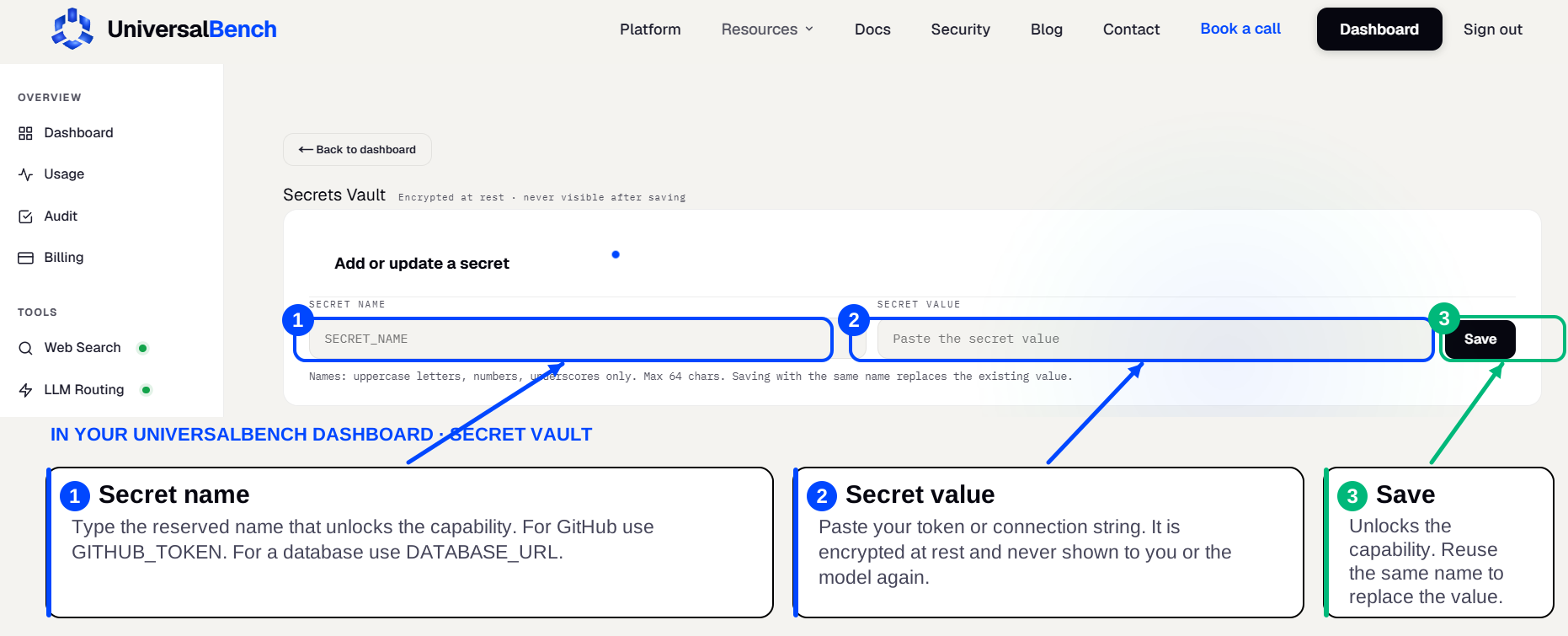
See the server →Your secrets live in an encrypted secret vault
When a capability needs a credential, a GitHub token, a database URL, an API key, you save it once in your secret vault. You enter the secret name on the left and the secret value on the right, then save. Your AI never sees the value, it is never shown in the chat, and the matching capability unlocks automatically.
Why one server beats ten
Single-purpose MCP servers each do one thing. A GitHub server reads your repo. A database server runs a query. But real work is never one step. You search the web, run code on what you found, write the result to a database, then commit it. No single-purpose server can do that chain on its own. UniversalBench carries the whole combination, so one connection does the job of ten servers wired together, and you keep one URL, one secret vault, and one bill instead of ten of each.

Real work is never one step
Nobody runs just one tool. The moment a task gets real, it needs several working together, and that is exactly where a single-purpose server falls short.
Triage a failing build
Search the web for the error, read the repo, run the failing test, write the fix, and commit it. That one task spans web search, GitHub, and code. A GitHub-only server can read the repo but cannot search the web or run the test. UniversalBench does the whole chain.
Answer a question about your numbers
Query the database, analyze the rows in code, look up a benchmark on the web, and return the figure. A database-only server hands back rows and stops. UniversalBench queries, computes, and looks up the context in one go.
Keep a record current
Find the latest figure online, compute the change in code, write it to the database, and post a note to the team. No single-purpose server spans web, code, database, and messaging. UniversalBench does it end to end.
Why a hosted server beats self hosting
| Self hosted | UniversalBench | |
|---|---|---|
| Setup | One server per tool | One URL for all |
| Maintenance | You keep them running | Hosted for you |
| Safety | You secure each one | Guards built in |
| Credentials | Wired into config files | Encrypted vault, never shown |
Frequently asked questions
What is the UniversalBench MCP server URL?
It is one URL you paste into your AI. After that, every capability is available behind it, and you save any credentials once in the encrypted secret vault.
Do I need to host the MCP server myself?
No. UniversalBench is hosted. There is nothing to install or keep running. You connect the URL and your AI can act.
Does it work with ChatGPT and Gemini?
Yes. It uses the standard MCP protocol, so it works with Claude, ChatGPT, Gemini, and any MCP-compatible AI.
Using MCP with agent skills
Skills tell your AI what to do. UniversalBench is where the work runs. See how agent skills run on UniversalBench, including Claude skills and Claude Code skills.
MCP for your AI assistant
MCP for Claude
Connect the server to Claude in a couple of steps.
See how →MCP for Cursor
Add the server to Cursor and unlock every capability.
See how →MCP for ChatGPT
Use the server as a custom connector in ChatGPT.
See how →MCP for Gemini
Wire the server into the Gemini CLI.
See how →MCP for Codex
Add the server to Codex through its config.
See how →