MCP for Gemini
Give Gemini the power to act through MCP. UniversalBench is a hosted MCP server, so instead of installing and running a server per tool, you connect one URL in Gemini and it can run code, search the live web, read and write databases, commit to GitHub, work with files, and more, with safety built in.
Add the MCP server to Gemini
Open your settings.json
Open ~/.gemini/settings.json, the Gemini CLI configuration file.
Add the UniversalBench server
Add the entry below under mcpServers, using httpUrl for the hosted server.
Save and restart
Save the file and restart Gemini CLI so it loads the server.
Ask in the CLI
Ask Gemini to use it. It can run code, query databases, search the web, commit to GitHub, and more.
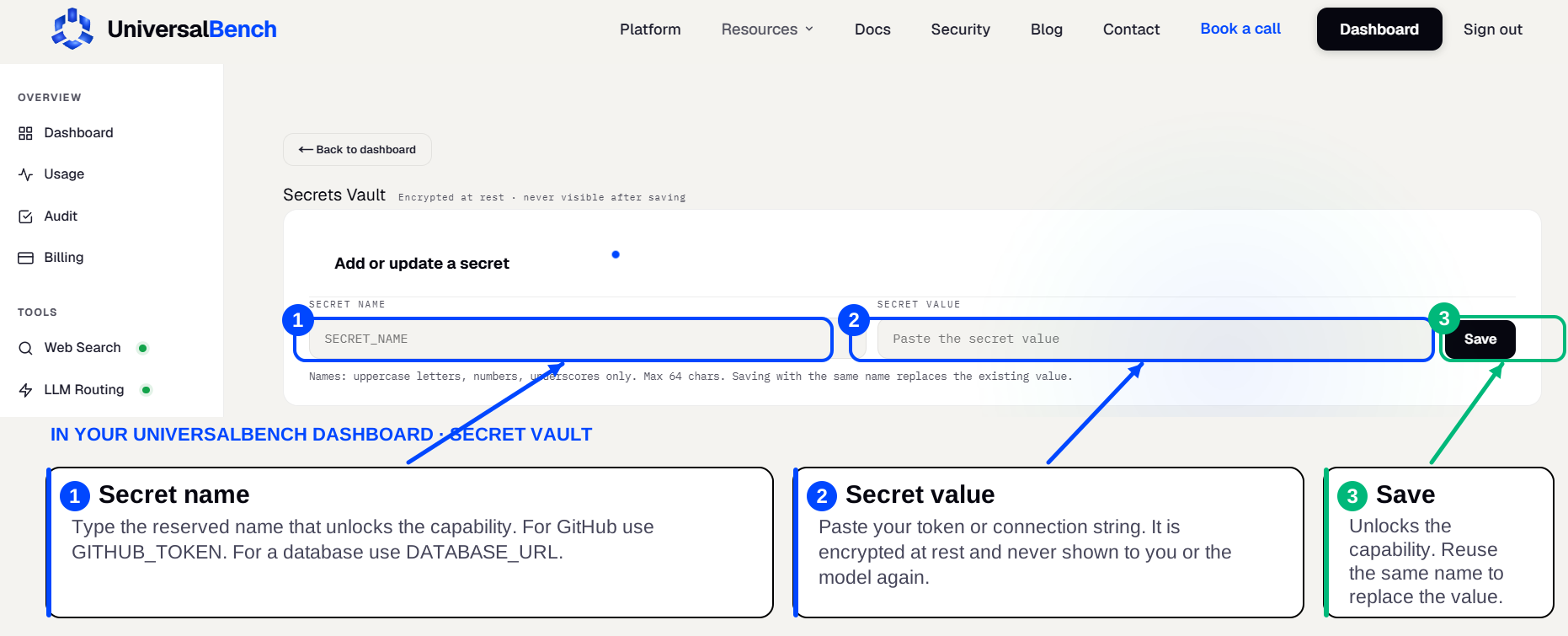
Your secrets live in an encrypted secret vault
When a capability needs a credential, a GitHub token, a database URL, an API key, you save it once in your secret vault. You enter the secret name on the left and the secret value on the right, then save. Gemini never sees the value, it is never shown in the chat, and the matching capability unlocks automatically.
What Gemini can do once connected
GitHub
read repositories and commit validated code changes
Slack
post messages and read through the Slack API
Postgres
query and update any PostgreSQL-compatible database
Notion
read and update Notion pages and databases
Filesystem
read, write, convert, and analyze files in an isolated sandbox
Web Search
search the live web and return processed results
Google Sheets
read and update Google Sheets
Gmail
read and send Gmail
One hosted server beats wiring up many
Most MCP servers do one job and you run each one yourself. With UniversalBench you point Gemini at a single hosted URL and every capability is there, so there is nothing to install, nothing to keep running, and your credentials sit in an encrypted secret vault instead of scattered across config files.
| Many self hosted servers | UniversalBench | |
|---|---|---|
| Setup in Gemini | One entry per tool | One URL |
| Maintenance | You keep each running | Hosted for you |
| Coverage | One tool per server | 20+ capabilities |
| Credentials | In config files | Encrypted vault, never shown |
Frequently asked questions
How do I add an MCP server to Gemini?
Open ~/.gemini/settings.json, the Gemini CLI configuration file. Add the entry below under mcpServers, using httpUrl for the hosted server. Save the file and restart Gemini CLI so it loads the server.
Does it cost anything?
You can start free. UniversalBench gives the first 1,000 calls per month free with no credit card, then it is pay as you go.
Does it work with other AIs too?
Yes. The same hosted MCP server works with Claude, ChatGPT, Gemini, Cursor, and any MCP-compatible AI. Connect the one URL wherever you work.
