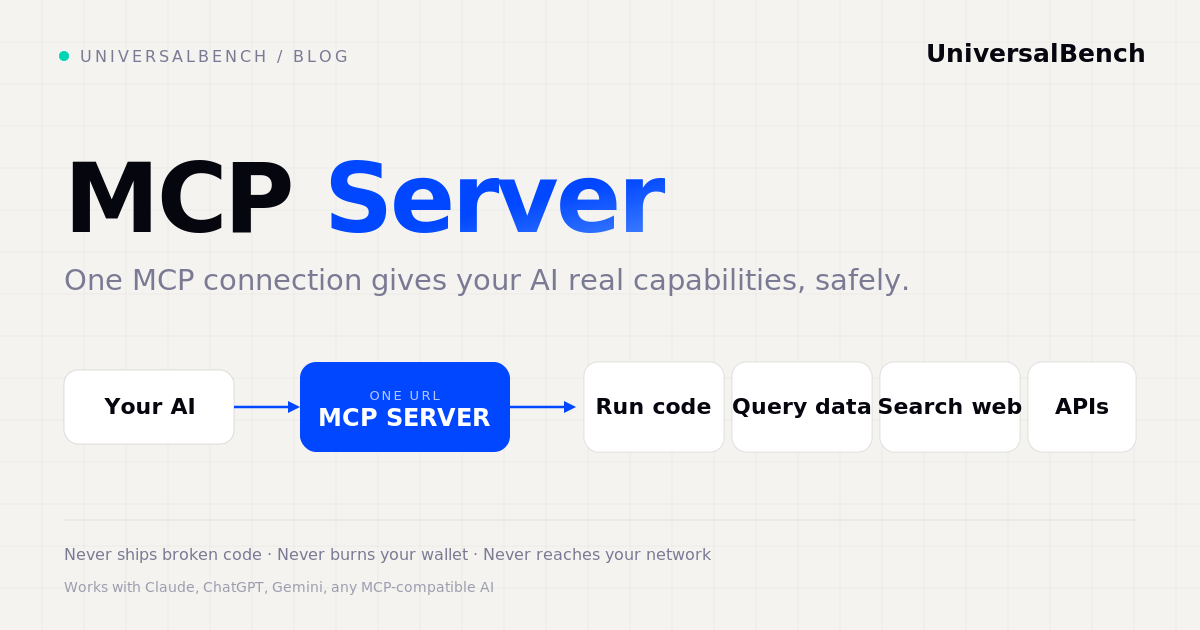
An MCP server is a program that gives an AI model the ability to act. The model can reason and write text on its own, but it cannot run code, read a database, search the live web, or call an API. An MCP server is the connection layer that provides those abilities. The AI talks to the server over the Model Context Protocol, the open standard that lets any model use any tool through a single connection. You point your AI at one MCP server URL, and from that moment it can do real work instead of only describing it.
What is an MCP server?
MCP stands for Model Context Protocol. It is an open standard for connecting AI models to tools and data. An MCP server is the tool side of that connection: it exposes a set of capabilities that an AI client can call, in a format every compatible model understands. Think of it as a universal port for AI. Instead of writing custom glue for each model, you implement the protocol once and any MCP-compatible AI can plug in. Claude, ChatGPT, Gemini, and other models all speak the same protocol, so the same server works with all of them.
What an MCP server actually does
A good MCP server turns a chat model into something that gets work done. The capabilities usually fall into a few groups:
Run code. The model writes a script, the server executes it in an isolated sandbox and returns only the result. Query data. The server reads and writes databases on the model's behalf, using credentials the model never sees. Search the web. The server fetches live results so answers are current instead of frozen at the training cutoff. Call any API. The server makes HTTP requests, handles auth, and hands back clean output. Commit changes. The server can write files and push code, with validation in front of every change.
The important part is that all of this happens outside the model. The work runs on the server, and the model only reads the finished answer. That is what makes the pattern both safer and dramatically cheaper. For a wider view of this layer, see AI agent infrastructure: the missing layer.
How to connect an MCP server to your AI
Connecting is the easy part. You do not need to write code. The steps are the same across most clients:
- Pick an MCP server that offers the capabilities you need, such as code execution, database access, and web search.
- Get its connection URL. A hosted server gives you one URL tied to your account, for example
https://universalbench-mcp.penantiaglobal.workers.dev/u/your-api-key. - Paste the URL into your AI client. In Claude.ai you add it as a connector. In the Anthropic Messages API you pass it in the
mcp_serversparameter. Other MCP-compatible apps have a similar connect field. - Let the AI discover the tools. Once connected, the model automatically sees every capability the server exposes. There is nothing to configure.
- Ask for something that needs a tool. Tell the AI to analyse a file, query your data, or check a live source, and it will use the server to do it.
Because the protocol is a standard, the same server works with Claude, ChatGPT, Gemini, and any MCP-compatible AI. You connect once and use it everywhere.
MCP server vs MCP client vs MCP tools
These three terms describe the same connection from different sides. The MCP client is the AI side, the model or app that wants to use a capability. The MCP server is the tool side, the program that provides capabilities and runs the work. MCP tools are the individual capabilities a server exposes, such as run code or search the web. An MCP connector is simply the link a client uses to reach a server. So when you connect your AI to a server URL, your client is calling the server's tools through a connector. You do not build any of this plumbing yourself, the protocol handles it.
What a safe MCP server looks like
Giving an AI the power to run code and touch your data only makes sense if safety sits below the agent, where the model cannot talk its way around it. A well built MCP server enforces three guarantees in code:
These are not prompts asking the model to behave. They run underneath the model, so they hold even if the AI is wrong or is pushed to misbehave. For more on this, read what MCP security actually takes.
Do you need to build your own MCP server?
You can. Anyone can implement the protocol, and for a single narrow tool that is a reasonable project. For most teams, though, a hosted server that already bundles code execution, data access, web search, API calls, and the safety layer is far faster to adopt and cheaper to run. The cost difference is real. When the server does the work and returns only the answer, the model reads a fraction of the data. In one log analysis test, processing on the server cut input tokens by 96.5 percent compared with doing the same work inside the chat, and the server answer was correct where the in-chat answer was wrong. Doing the work in the right place saves money and improves accuracy at the same time.
Doing it with UniversalBench
Here is the part that changes your workflow: you do not build any of this yourself. You connect one URL and ask in plain language. Paste your UniversalBench address, universalbench-mcp.penantiaglobal.workers.dev/u/your-key, into Claude, ChatGPT, Gemini, or any MCP-compatible AI. That single connection is the whole setup.
Then you ask, for example:
"Search the web for the current pricing of these five tools and give me a comparison table."
Behind that one request, UniversalBench:
- runs the web search and builds the comparison table on the server
- checks the facts in real code, not from the model's memory
- hands your AI only the finished table, not pages of raw search results
A plain chat model cannot search the web or run code. Through one UniversalBench connection it can, and because the work happens on the server, your AI reads only the result, which is both cheaper and more accurate. In our tests the same model went from confidently wrong to correct once the work ran on the server, often using fewer tokens too. And the guarantees hold the entire way: your AI never ships broken code, never exceeds the cost ceiling you set, and cannot reach a private network. We build and run our own tools, including this site, on the same connection.
Questions about MCP servers
Is MCP only for Claude? No. The Model Context Protocol is an open standard, so an MCP server works with Claude, ChatGPT, Gemini, and any MCP-compatible AI.
Do I need to code to use an MCP server? No. You connect the server URL to your AI client and then ask for what you want in plain language. The model picks the right tool.
Is it safe to let an AI reach my database? With the right server, yes. Credentials live in an encrypted vault the model never sees, and access runs under safety rules below the agent. See safe AI database access.
How much does an MCP server cost? It depends on the provider. A usage based server bills per call, often with a free tier. UniversalBench includes 1,000 calls a month free, then charges per call after that.
Give your AI an MCP server
Connect one URL and your AI can run code, query data, search the web, and call any API, with safety enforced below the agent.
Get your API key